
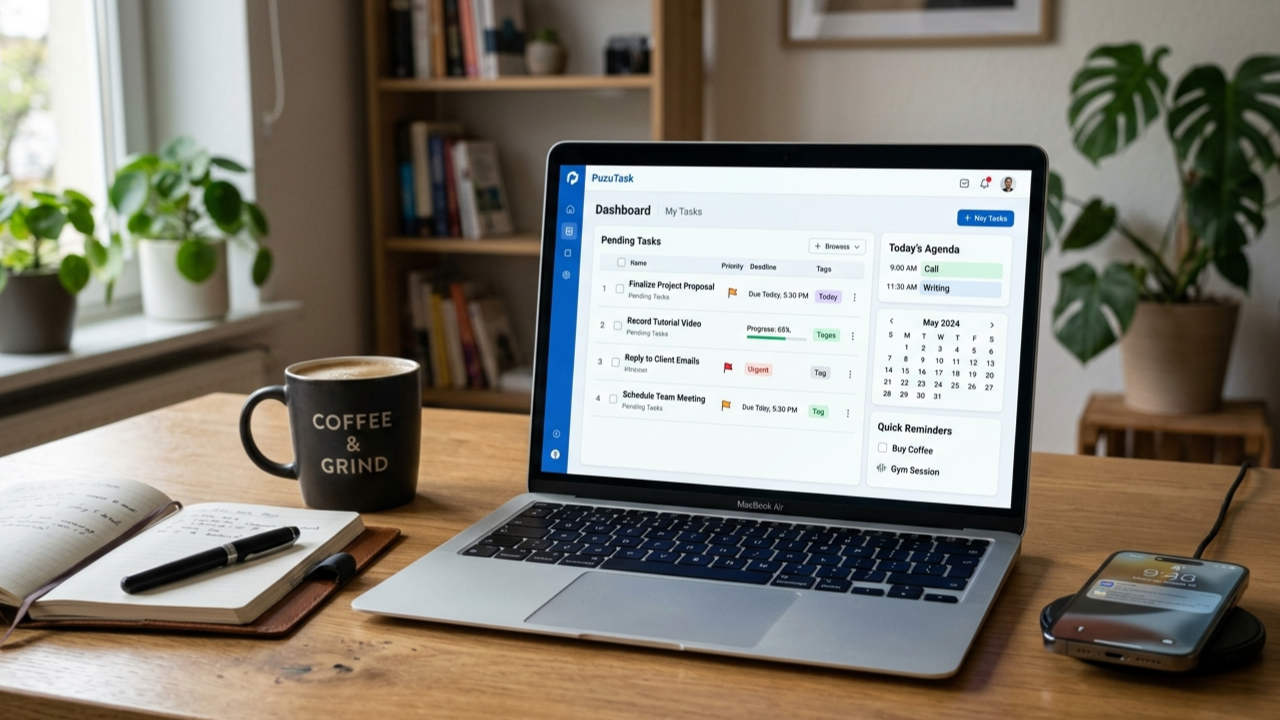
A few weeks ago, I had one of those messy workdays where everything felt scattered.
I had browser tabs open everywhere, half-written notes in Google Docs, reminders on my phone, and a sticky note on my desk that somehow disappeared right when I needed it. I kept switching between tasks without finishing anything properly.
That’s when I came across PuzuTask.
At first, I honestly thought it would be another “productivity app” that looks good for five minutes and then becomes just another unused bookmark. I’ve tried too many of those already — some were too complicated, others required endless setup before you could even create a simple task.
But after spending several days using PuzuTask in real work situations, I noticed a few things that made it surprisingly practical.
This article is basically my real experience using it, what worked for me, where I got stuck, and the small habits that made the platform more useful over time.
My First Impression of PuzuTask
The first thing I noticed was that the interface didn’t try too hard.
That may sound strange, but many task management tools overload you with dashboards, charts, complicated project systems, and features you may never touch. PuzuTask felt lighter and easier to understand from the beginning.
I signed up expecting a long onboarding process, but I was able to create tasks within minutes.
For someone who gets distracted easily, that simplicity matters more than people realize.
I tested it mainly for:
- Daily work planning
- Content writing schedules
- Tracking small client tasks
- Remembering deadlines
- Organizing random ideas before they disappear
And honestly, it handled basic workflow management pretty well.
What I Actually Used It For
A lot of reviews talk about “productivity” in vague terms, so here’s how I personally used PuzuTask during the week.
1. Breaking Big Work Into Smaller Tasks
This was the biggest improvement for me.
Usually, when I write “Finish article” on a to-do list, I avoid it because it feels too large. Instead, I started creating smaller tasks like:
- Research topic
- Write introduction
- Add screenshots
- Edit headings
- Final proofreading
Seeing smaller tasks checked off gave me momentum.
It sounds simple, but mentally it makes a huge difference.
2. Managing Multiple Projects Without Confusion
I often work on several things at once:
- Blog content
- SEO updates
- Website fixes
- Client communication
- Social media drafts
Normally, everything mixes together in my notes app.
Inside PuzuTask, separating tasks by category made things less chaotic. I could quickly see what needed attention without scrolling through endless notes.
That alone reduced a lot of stress during busy days.
3. Quick Reminder System
One thing I appreciated was setting reminders for small but important things.
Not huge deadlines.
I mean tiny tasks people forget all the time:
- Reply to a client
- Renew a domain
- Upload an image
- Check analytics
- Send invoice
Those little tasks are usually what create unnecessary problems later.
After missing a couple of minor deadlines recently, I started relying on reminders more seriously.
Where I Made Mistakes While Using It
This part is important because productivity apps only work if your system is realistic.
At first, I made the classic mistake:
I added too many tasks.
My first day looked ridiculously ambitious.
I had around 25 tasks listed, and by evening I completed maybe 8 of them. Instead of feeling productive, I felt behind.
After two days, I changed my approach.
Now I only create:
- 3 important tasks
- 3 smaller optional tasks
That setup worked much better.
If you overload any task manager, it stops helping and starts becoming another source of pressure.
Features That Felt Useful in Real Life
Instead of listing every feature, here are the ones I genuinely found practical.
Clean Task Organization
This sounds basic, but clean organization affects focus more than people think.
I’ve used apps where finding old tasks became frustrating. PuzuTask stayed simple enough that I didn’t waste time searching through menus.
That helped me stay focused on actual work instead of managing the app itself.
Fast Task Creation
One underrated thing in productivity tools is speed.
If adding a task takes too long, most people stop using the system consistently.
With PuzuTask, I could quickly add ideas while working.
That mattered because random work ideas usually disappear fast if you don’t capture them immediately.
Useful for Solo Work and Freelancing
I think freelancers and solo creators may benefit from this kind of tool more than large teams.
When you work alone, your brain becomes the project manager, scheduler, editor, and reminder system all at once.
That becomes exhausting after a while.
Having one place for pending tasks reduced mental clutter for me.
How I Integrated It Into My Daily Routine
The app became more useful once I stopped treating it like a “perfect productivity system.”
Instead, I used it in a very practical way.
Here’s the routine that actually worked for me:
Morning Planning (5 Minutes)
Every morning I:
- Opened PuzuTask
- Checked unfinished tasks
- Picked top priorities
- Removed unrealistic goals
This helped me start work with clarity instead of confusion.
Midday Adjustment
Around afternoon, I usually realize some plans were unrealistic.
Instead of ignoring unfinished tasks, I started reorganizing them.
That small habit prevented the guilt cycle that happens when task lists become overwhelming.
Evening Cleanup
Before stopping work:
- I checked completed tasks
- Deleted unnecessary items
- Planned tomorrow’s priorities
This made the next morning much smoother.
Real Situations Where It Helped Me
Here are a few real examples from my week.
Case 1: Article Deadlines
I had two blog articles due the same week.
Normally I procrastinate until the last moment because large writing projects feel mentally heavy.
Breaking them into smaller steps inside PuzuTask made them feel manageable.
Instead of “write full article,” I focused on one section at a time.
That reduced stress immediately.
Case 2: Website Maintenance Tasks
I constantly forget technical maintenance work like:
- Plugin updates
- Backup checks
- Broken links
- Image compression
These tasks are boring, which makes them easy to delay.
Setting recurring reminders helped me stop ignoring them.
Case 3: Random Business Ideas
One thing I noticed:
Good ideas often come at inconvenient times.
Sometimes while browsing, eating, or watching YouTube.
I started instantly saving quick task ideas instead of trusting memory.
Surprisingly, several useful content ideas came from those random notes later.
Who I Think PuzuTask Is Best For
After using it personally, I think it works best for:
- Freelancers
- Bloggers
- Students
- Small business owners
- Remote workers
- People managing side projects
Especially people who want something lightweight instead of overly technical project management software.
If you love highly advanced systems with complex automation, you may prefer bigger platforms.
But if your main problem is “I keep forgetting things and losing focus,” simpler tools are often more effective.
Common Productivity Mistakes I Realized While Using It
Using PuzuTask also exposed a few bad habits I didn’t notice before.
Trying to Do Everything in One Day
This was my biggest issue.
Task managers don’t magically create more time.
They only help organize reality better.
Once I accepted that, planning became more realistic.
Keeping Tasks Too Vague
Tasks like:
- Work on website
- Improve business
- Write content
…are too broad.
Specific tasks work much better.
For example:
- Update homepage headline
- Compress blog images
- Write 500 words for draft
Smaller targets are easier to complete consistently.
Ignoring Small Tasks
Tiny unfinished tasks create hidden mental pressure.
Replying to one email may take two minutes, but delaying it all week wastes more mental energy than actually doing it.
This app helped me notice that pattern.
Things I’d Personally Improve
No tool is perfect, obviously.
A few things I’d still like to see improved:
- More customization options
- Better visual progress tracking
- Faster mobile experience in some situations
- Additional integrations with other platforms
None of these were deal-breakers for me, but they would improve long-term usage.
My Overall Experience After One Week
After several days of actual use, I understood something important:
Productivity apps only work if they reduce friction.
PuzuTask helped mainly because it stayed simple enough that I actually continued using it.
That sounds obvious, but many tools fail exactly there.
Complicated systems often look impressive but become exhausting after a few days.
What helped me most was:
- Clear daily priorities
- Smaller task breakdowns
- Quick reminders
- Reduced mental clutter
And honestly, that’s probably what most people need anyway.
If you struggle with scattered notes, forgotten tasks, or inconsistent planning, trying a lightweight task manager like PuzuTask may genuinely help you organize work without overcomplicating everything.
